![logo_moinai-full-transparent-1.png]](https://helpcenter.moin.ai/hs-fs/hubfs/logo_moinai-full-transparent-1.png?height=40&name=logo_moinai-full-transparent-1.png)
Clarifying questions are a central element of conversation guidance in moinAI. They help the chatbot narrow down ambiguous user enquiries beforehand, collect required information in a structured manner, and guide users reliably towards their goals. Depending on the use case, you can configure clarifying questions manually within editorial topics or generate them dynamically through AI agents using intelligent conversation guidance.
- Why are clarifying questions important?
- Editorial clarifying questions (manual control)
2.1 Confirmation questions for uncertain intent
2.2 Yes/No & multiple-choice questions
2.3 Rating questions
2.4 Clarifying questions in forms - Generated clarifying questions (AI-supported)
1. Why are clarifying questions important?
A chatbot responds with the highest precision when the enquiry from users is distinct. Targeted clarifying questions prevent the chatbot from making incorrect assumptions when faced with vague requests. Inquiry for details offer key benefits:
- Precise answers: Narrow down ambiguous inputs step by step before outputting information.
- Structured guidance: Guide users through complex topics via clear response options.
- Complete data collection: Capture all necessary information systematically during service requests or lead generation.
2. Editorial clarifying questions (manual control)
Configure clarifying questions manually in editorial topics and general conversation guidance. Editorial questions follow predefined rules and paths.
2.1 Confirmation questions for uncertain intent
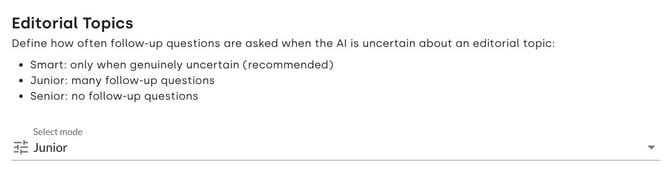
When the AI chatbot is uncertain whether a recognised editorial topic matches the user intent, it displays a confirmation question. They only appear in editorial topics. You can adjust this behaviour under Bot Settings > General settings & Privacy within the Editorial Topics section:
- Smart (recommended): The chatbot asks clarifying questions dynamically if users frequently responded with "No" in the past or if the topic has rarely been requested.
- Junior: Default behaviour with frequent confirmation questions.
- Senior: The chatbot asks no confirmation questions.
If ‘Custom’ mode is selected, a customised behaviour takes effect. This can be overridden by one of the three standard modes.
2.2 Yes/No & multiple-choice questions
Within individual editorial responses, you can insert interactive question elements to break down enquiries step by step:
- Multiple Choice Question: Displays question text alongside several quick-reply buttons (for example, selecting between "Rooms & Suites", "Spa & Wellness", or "Table Reservation").
- Yes / No Question: Provides two fixed selection buttons ("Yes" / "No"). The chatbot also recognises and processes free-text answers such as "Yes, please" automatically.
2.3 Rating questions
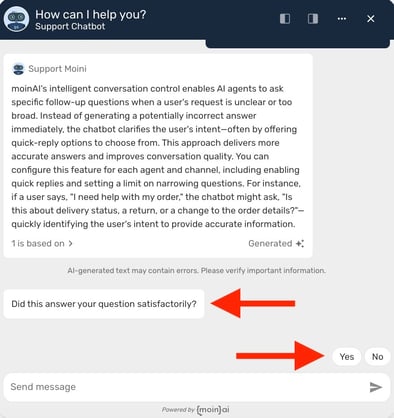
After delivering an informative answer, you can include a rating question at the end of the response (for example, "Was I able to answer your question correctly?").
- Positive (Yes): Routes the user automatically into the Happy Path, offering further topics or menu options.
- Negative (No): Routes the user into the Unhappy Path to suggest alternative inputs or direct contact with customer service.
2.4 Clarifying questions in forms
When contact details or specific user information are required to resolve an enquiry, forms guide users through the process in a structured manner. Automated prompts collect all necessary details via free text or predefined options before triggering a Human Takeover to the responsible service team.
3. Generated clarifying questions (AI-supported)
While editorial content relies on predefined pathways, AI agents can generate clarifying questions dynamically and in real time based on conversation context.
Through the Intelligent Conversation Guidance feature, AI agents clarify ambiguous requests independently before generating an answer. Such proactive clarification prevents inaccurate assumptions and substantially improves response quality. Dynamic AI clarifying questions are active in live operations, in the preview, and in the AI Playground. Refer to the Knowledge Base article for full setup instructions.
To allow AI agents to ask clarifying questions independently, you must activate Intelligent Conversation Guidance beforehand. Do not add manual instructions to ask clarifying questions in the prompt instructions without enabling this feature, as this leads to unintended chatbot behaviour.