![logo_moinai-full-transparent-1.png]](https://helpcenter.moin.ai/hs-fs/hubfs/logo_moinai-full-transparent-1.png?height=40&name=logo_moinai-full-transparent-1.png)
User enquiries can be answered automatically in 98 different languages. Separate chatbot channels can be added for each language, and their content can be specifically controlled and evaluated in the hub.
A multilingual function also enables the AI chatbot to automatically respond to users in 26 different languages within a single channel. This eliminates the need to create a separate channel for each supported language and maintain content multiple times. This leads to a significant reduction in editorial effort while enabling global scalability of the chatbot.
The translation is done directly by the stored LLM.
1. Functionality of multilingualism
When the chat widget is opened, the user's browser language is first transmitted in order to display content in that language. As the conversation progresses, the language of each user request is analysed and, if necessary, the content is displayed in the newly recognised language.
-
Language continuity: Once a language has been recognised, it remains active for the entire session of a conversation.
-
Language change: The response language is only changed if the user clearly changes the language.
-
Fallback: If a language is not recognised or supported, the response is given in the channel's default language as defined in the hub.
Within an active form, the conversation language does not change automatically. The selected language remains consistent throughout the entire data query process to ensure a consistent conversation flow, even if a single input is identified as being in a different language.
Editorial content (topics and conversation elements) stored in the channel's default language is automatically translated into the recognised target language.
-
Labelling: Translated texts are marked with the note ‘Auto-translated’ in the widget.
-
Original display: By clicking on the note, users can optionally display the original text.
Responses generated directly by AI agents appear without a translation note, as they are created natively in the target language.
Example: How speech recognition works
The video illustrates the automated processing of an English user query within a German chatbot channel with the browser set to German.
2. Activation and configuration in the hub
The multilingual function can be activated in the moinAI hub and is then immediately available.
-
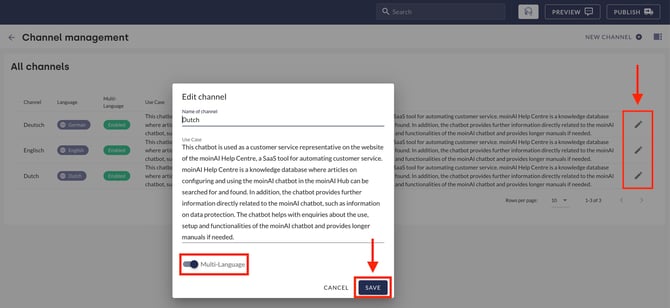
Navigate to the menu item Bot Settings > Channel Management.
-
Select and edit the desired channel using the pencil icon.
-
Activate the Multilingualism toggle.
-
Click Save to apply the function to the channel.
Customising widget labels
The labels for translation notes are excluded from automatic translation and are determined editorially. The labels can be customised for each channel.
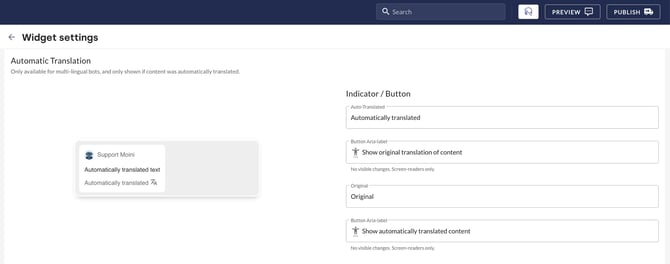
- Open the menu item Widget & Teaser > Widget Display.
- In the Automatic Translation area, you can customise the labels for Automatically Translated and Original as well as the associated Aria labels for accessibility.
3. Best practices: Multilingualism vs. separate channels
Although the multilingualism feature drastically reduces maintenance effort, there are scenarios in which separate channels for different languages are more advantageous.
| Requirement | Recommendation | Reason |
| Same content, responses and links for all countries. | Multilingual function | Maximum efficiency through automatic translation. |
| Different information depending on region (e.g. Germany vs. Austria vs. Switzerland). | Separate channels | Country-specific content requires individual maintenance. |
| Need for optimised texts per language. | Separate channels | Manual translations are only possible via separate channels and allow complete control over all content in the chat. |
| Different personas per language (e.g. formal vs. informal). | Separate channels | Different tones require separate configurations. |
| Need for separate analysis of bot performance by language area or region | Separate channels | Enables the individual collection and presentation of statistics and key performance indicators for each individual channel. |
4. Supported languages
The AI chatbot currently supports up to 25 languages as part of this feature. These include the following as standard:
- Arabic, Chinese (Traditional), Croatian, Czech, Danish, Dutch, English, Estonian, Finnish, French, German, Hungarian, Italian, Japanese, Lithuanian, Norwegian, Polish, Portuguese, Romanian, Russian, Slovak, Slovenian, Spanish, Swedish, Turkish, Ukrainian
- Additional languages are available upon request. In addition, individual languages can be deactivated for chatbots upon request.
The AI understands a total of 98 languages. However, the automated translation and response function within a channel is optimised for the languages listed above.