![logo_moinai-full-transparent-1.png]](https://helpcenter.moin.ai/hs-fs/hubfs/logo_moinai-full-transparent-1.png?height=40&name=logo_moinai-full-transparent-1.png)
Small talk topics enable the AI chatbot to respond to enquiries that are not product-specific, such as questions about the weather, greetings or insults. This allows an appropriate response to be provided even for non-technical enquiries, which contributes to more natural communication.
Small talk topics are not deducted from the existing topic quota.
-
Adding small talk topics
-
Structure of a small talk response
-
Change log
-
List of all available small talk topics
-
Disabling small talk topics
-
Best practices for small talk responses
1. Add small talk topics
Small talk topics can be created, in a similar way to regular new intents, via New intent in the topic overview. In the New intent sidebar that opens, select the ‘Small talk’ category under All templates to list all existing small talk topics.
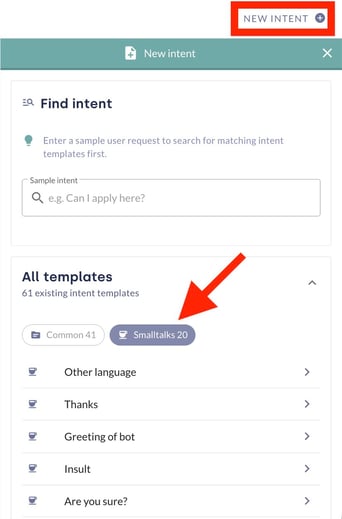
Simply click on the small-talk topic of your choice and then on Add intent to add it to the list of topics, where it will be available directly in the AI chatbot.
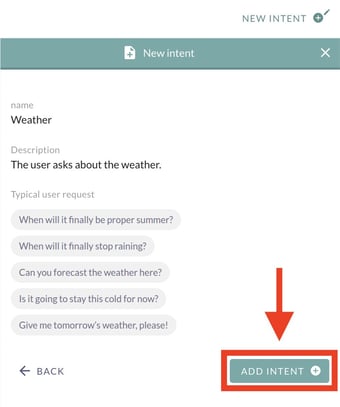
Once a small-talk topic has been created, a sample response is automatically provided. The pre-filled response content can be edited freely and should be adapted to your specific use case and the desired wording.
2. Structure of a small talk response
The response to a small-talk topic consists of at least one text field. In addition, the following options are available:
-
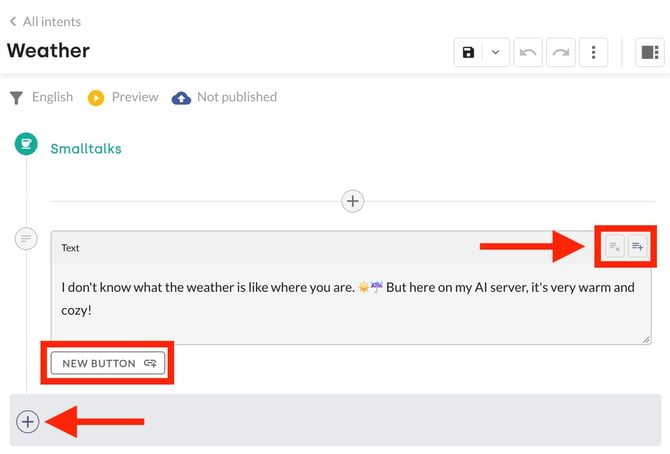
Buttons below text fields: Using the New Button option, buttons with pre-defined links can be placed below the text fields. These are set up in the same way as for regular topics. Details can be found in the section Text in the Topic Content Editor.
-
Response variants: For simple blocks of text, several response variants can be stored, which the system displays at random. This feature is accessed in the top-right corner of the text field, in the same way as when setting up response options, as described in the article on conversation management.
-
Quick-reply buttons: Quick-reply buttons can be added using the bottom-most plus icon in the final response step. These redirect users to another form, topic or AI agent, in the same way as the Follow-up feature in the topic content editor.
-
Additional content elements: By clicking on the plus icon within a response step, you can insert additional content elements to present the flow of information visually. These behave in exactly the same way as the content elements in the topic content editor. You can choose from text, image, video, slides, context and webhook. A complete overview can be found under Content Elements.


3. Change log
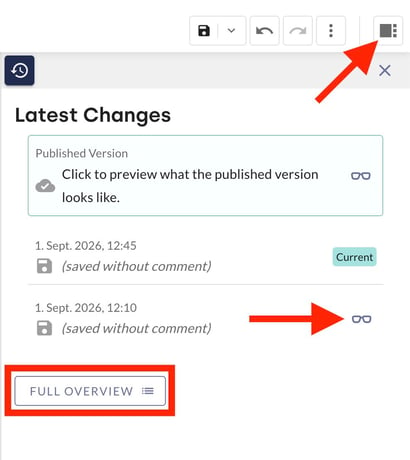
As with intent content, the change history can be viewed using the additional function.
4. List of all available small talk topics
-
Age
-
Other language
-
Thanks
-
Greeting of bot
-
Insult
-
Are you sure?
-
Do not need you
-
Skills
-
Gender
-
Intelligence
-
Can nothing
-
Human nature of bot
-
Talk with people
-
Name
-
Meaning of life
-
Inappropriate request
-
Goodbye
-
In love
-
Weather
-
How are you?
-
Joke
5. Disable small talk topics
Disabling small talk topics is done in exactly the same way as disabling topic content. Click on Change status in the three-dot menu and then set the status to ‘Disabled’.
Confirm these settings by clicking Save, then use the floppy disc icon to save and publish the changes for the entire small talk topic. The small talk topic will now no longer be displayed in the live chatbot.
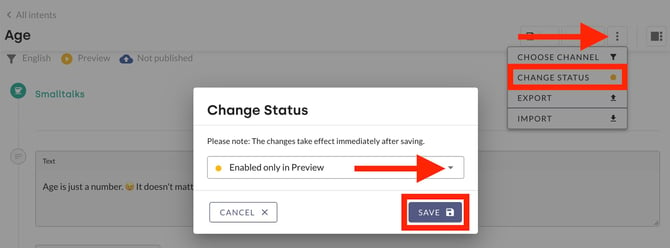
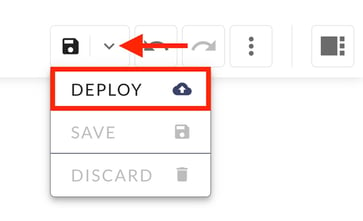
Simply deactivating the Smalltalk topics is sufficient to prevent them from being displayed. The Customer Success Team can assist with the permanent and irreversible deletion of Smalltalk topics at customersuccess@moin.ai. Deleted Smalltalk topics cannot be reactivated and will no longer appear in the list of Smalltalk topics.
You can also switch channels via the three-dot menu, and import and export Smalltalk content as JSON.
6. Best practices for small talk responses
For some Smalltalk topics, the response should be tailored to the specific use case. These include topics such as ‘Talking to people’, ‘Skills’ or ‘Other language’.
It is recommended to display information on the topics the AI chatbot can assist with (Skills), the languages it supports (Other languages), or to include forms to put users in touch with a real person (Talking to people).
The small talk topic can thus identify non-product-related enquiries, and the appropriate response content can be displayed with the help of individually tailored responses.