![logo_moinai-full-transparent-1.png]](https://helpcenter.moin.ai/hs-fs/hubfs/logo_moinai-full-transparent-1.png?height=40&name=logo_moinai-full-transparent-1.png)
The Model Context Protocol (MCP) is a universal interface for connecting AI models to external data sources. The moinAI MCP server seamlessly links the moinAI Knowledge Base with external AI applications. The connection enables the Knowledge Base to be used and managed directly within other AI environments, thereby eliminating the need for custom interface programming.
1. Functionality
The moinAI MCP server acts as a bridge between the moinAI platform and external AI infrastructures. This integration enables knowledge content to be retrieved and managed automatically. As a result, corporate knowledge can be integrated dynamically into external workflows and content maintenance can be automated efficiently.
The process at a glance: a request is entered in the AI environment, such as Claude or Cursor, for example ‘Do we have any knowledge stored on returns?’ The MCP client of the AI environment forwards the request to the moinAI MCP server. The server runs the matching command in the Knowledge Base: query, update or delete content. The result returns the same way.
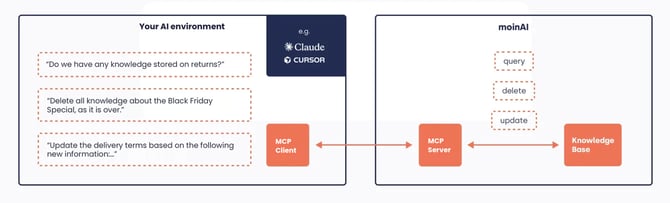
Benefits of the MCP server
-
Centralised knowledge management: External AI applications always access the latest version of the moinAI Knowledge Base, ensuring the consistency of information.
-
Efficient control: Content can be created, updated or deleted directly from the external working environment without having to switch between different tools.
-
Workflow automation: Thanks to standardised access, knowledge queries can be integrated directly into automated processes.
Video content: an internal company AI is asked ‘Do we have any knowledge stored on the topic of returns?’ The moinAI MCP server sends a query to the Knowledge Base and finds the returns policy. The AI replies with the stored rules. The video then shows examples of the three command types: query, delete and update.
2. Application scenarios
Using these tools enables the efficient management and utilisation of knowledge across system boundaries:
-
Verified knowledge source (
queryKnowledgebase): When working on complex tasks in an external AI environment, this tool serves to integrate the moinAI Knowledge Base as a verified data source (‘single source of truth’). -
Automated knowledge expansion (
createArticle): New insights or generated texts can be saved directly as drafts in the moinAI Knowledge Base without manual effort, which speeds up the editorial process. -
Efficient quality assurance (
retrieveArticles&updateArticle): By retrieving groups of articles, content can be systematically checked. Corrections or adjustments to terminology can be made directly via the interface for multiple articles simultaneously. -
Lifecycle management (
deleteArticle): Outdated information or time-limited campaign content can be automatically removed to keep the Knowledge Base up to date.
Deletions via the deleteArticle tool are permanent. No additional security prompt is issued within the Hub, as the command is authorised directly via the interface. Working with interfaces therefore requires particular care with access credentials and data integrity.
3. Commands and tools
Various actions can be executed directly via prompt or through automated commands via the interface.
| Tool | Description |
queryKnowledgebase |
Searches the moinAI Knowledge Base for relevant content. |
createArticle |
Creates a new article directly in the moinAI Knowledge Base. |
retrieveArticles |
Retrieves existing articles based on filter criteria. |
updateArticle |
Updates existing content within the Knowledge Base. |
deleteArticle |
Permanently removes articles from the moinAI environment. |
4. Set up the moinAI MCP server
Prerequisites
-
An installed version of Node.js on the local system
-
A compatible MCP host (e.g. Claude Desktop, Cursor or a custom LLM environment)
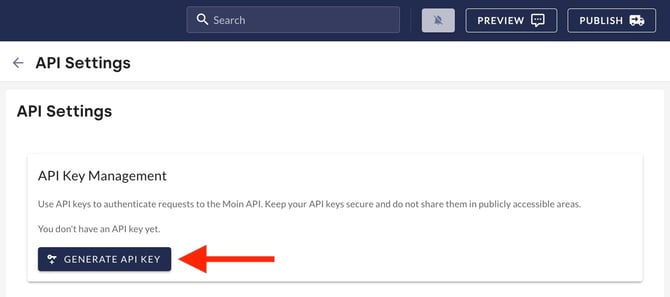
The connection is established via the moinAI Hub and by configuring the relevant MCP host. API keys are managed in the Hub under Bot Settings > API Settings.
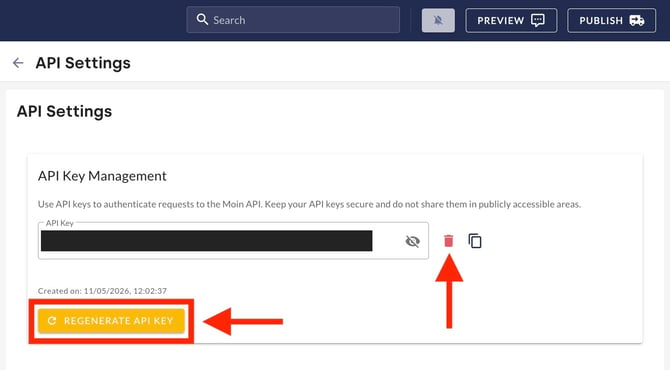
- Clicking Generate API key creates a new key. The key is needed for the next step. If misuse is suspected, Regenerate API key creates a new one. The bin icon deletes an API key permanently.
- Within the settings of the external AI application, the moinAI MCP server is added using the
npxcommand. The API key copied earlier must be set as an environment variable (MOIN_AI_API_KEY). -
Once the configuration has been saved, access to the Knowledge Base within the external application is active.
Detailed technical specifications and examples of integration into various environments are available in the official documentation on GitHub.
The API key grants extensive access to the Knowledge Base. Never share the API key publicly (e.g. in public repositories). If misuse is suspected, the key should be immediately and irrevocably deleted in the Hub under Bot Settings > API Settings and regenerated. Upon deletion, all services using this key will immediately cease to function.
5. Best practices
To ensure the highest possible quality and security when using the moinAI MCP server, the following guidelines apply.
-
Unique article titles: When automatically generating articles using
createArticle, care should be taken to ensure titles are concise and unique. Clear titles make it easier for both human editors and the AI to locate articles later on. -
Regular audits: Using
retrieveArticlesin combination with external scripts enables regular checks of the Knowledge Base for outdated terms or expired offers. -
Use test environments: Before applying automated deletion or update processes to the entire Knowledge Base, the functionality should be verified using individual test articles.