![logo_moinai-full-transparent-1.png]](https://helpcenter.moin.ai/hs-fs/hubfs/logo_moinai-full-transparent-1.png?height=40&name=logo_moinai-full-transparent-1.png)
Follow-up actions represent a specific type of AI actions. They enable the placement of a targeted call-to-action after information has been provided. An automatic follow-up question after the AI agent's response ensures a seamless transition to further topics or forms in the event of positive feedback from users. This mechanism supports structured conversation, which contributes significantly to increasing the conversion rate and a higher completion rate in self-service processes.
This article describes how AI actions are created, the benefits they offer, and what other actions are available in addition to follow-ups.
Set up follow-up action
This is created centrally within the AI chatbot's knowledge base.
-
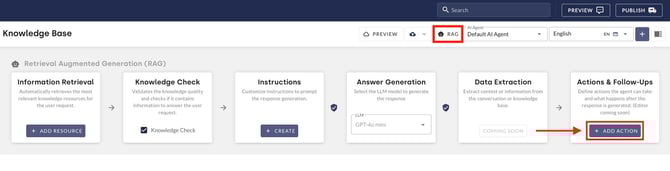
Navigate to the Knowledge Base menu item.
-
Click on the RAG button to open the RAG Management view.
-
The + ADD ACTION button within the Actions & Follow-Up card opens the input mask for a new action.
-
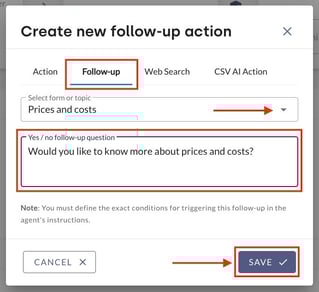
Select the Follow-Up tab within the mask.
-
Under Select form or topic, specify the target to which the forwarding should lead.
-
In the Yes/No follow-up question field, enter the text of the follow-up question (e.g. ‘Would you like to change your address now?’).
Note: The question you enter serves as the basis for the AI agent to generate different formulations for a natural dialogue flow. The core of the original question always remains the same. -
Click Save to create the follow-up action.
Activation via instructions
In order for a follow-up action to actually be triggered in the chat history, a corresponding instruction must be stored in the AI agent. This instruction defines the logical conditions under which the follow-up question is played out.
How instructions are created and optimised is described in detail in this article.