![logo_moinai-full-transparent-1.png]](https://helpcenter.moin.ai/hs-fs/hubfs/logo_moinai-full-transparent-1.png?height=40&name=logo_moinai-full-transparent-1.png)
The AI indicator shows users directly in the widget whether a response has been generated by generative AI. This labelling ensures transparency in the conversation. It also helps to comply with the legal labelling requirements for AI. Activating this feature is therefore important for user trust and the legally compliant use of the AI chatbot.
Labelling is only mandatory if the AI chatbot uses generative AI functions to answer questions. If only editorial content is displayed in the chatbot, there is no labelling requirement.
Set up the AI indicator
- Go to the menu item Widget & Teaser > Widget Appearance.
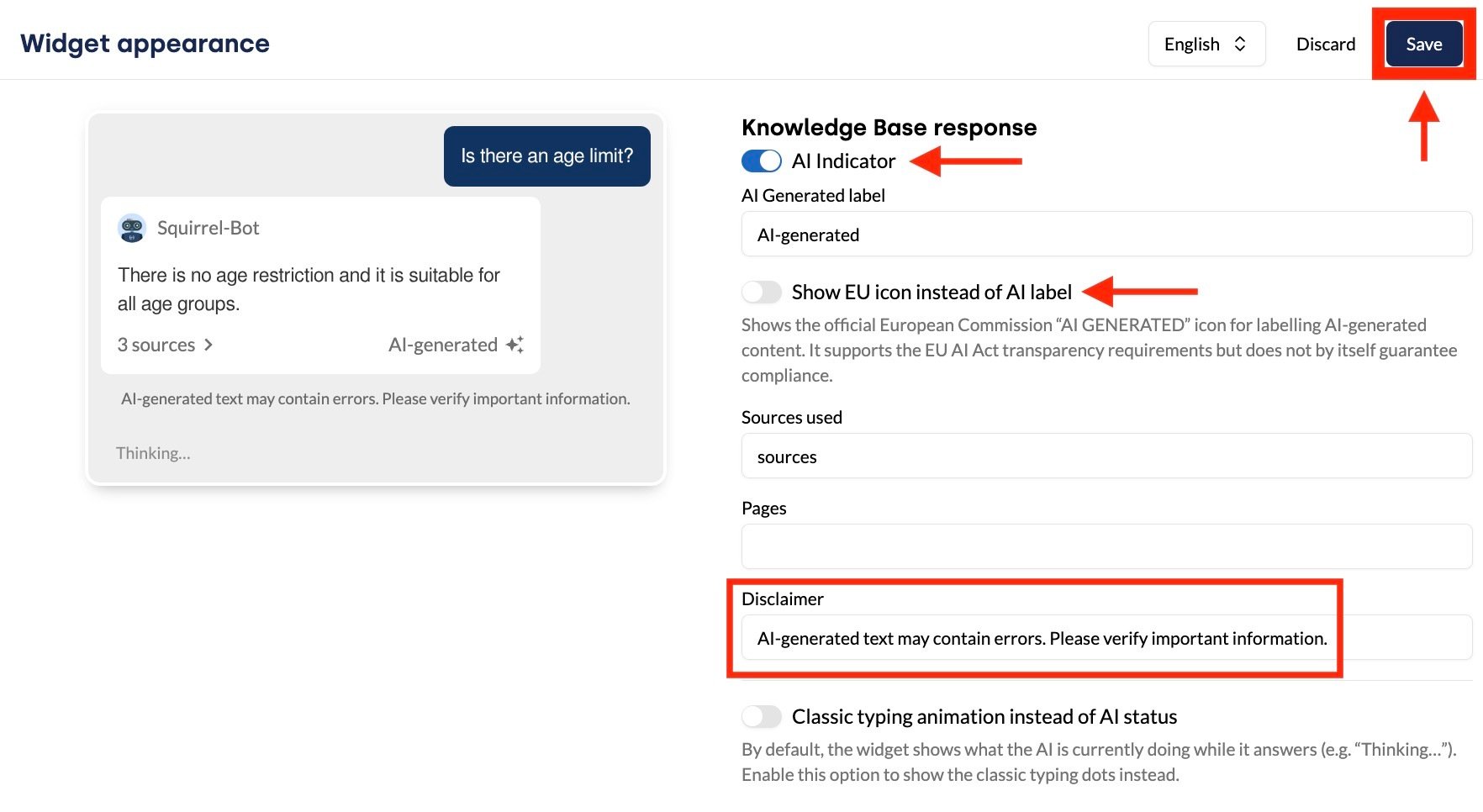
- In the Customize elements section under Knowledge Base response, activate the toggle for the AI indicator.
- In the AI label field, enter the desired label (e.g. “AI-generated” or “Generated”).
- Select the desired display format for the label:
- Text label: Enter your own label in the AI label field (e.g. ‘AI-generated’ or ‘Generated’).
- Official EU icon: Tick the box labelled Show EU icon instead of AI label. The widget will then display the European Commission’s official ‘AI GENERATED’ icon. This icon supports the transparency requirements of the EU AI Act (though it does not, on its own, guarantee full compliance).
- Recommended: Optionally, fill in the Disclaimer field (e.g. “AI-generated text may contain errors. Please verify important information.”) to display this text in the widget below each generated response.
-
Click the Save button to make the changes live.
Once published, the indicator will appear in the widget for all responses generated using GenAI functions.
In addition to fulfilling the AI labelling requirement, clearly labelling generated content also improves the chatbot’s comprehensibility and promotes digital inclusion. How further optimisations for accessible use (such as alt text or colour contrast) are implemented in accordance with the Accessibility Enhancement Act (BFSG) is described in this article on accessibility.