![logo_moinai-full-transparent-1.png]](https://helpcenter.moin.ai/hs-fs/hubfs/logo_moinai-full-transparent-1.png?height=40&name=logo_moinai-full-transparent-1.png)
AI agents are specialists in their field. They use generative AI (LLM) to respond individually and dynamically to incoming user enquiries. Compared to the responses provided by editorial topics, the responses of AI agents are not generic and repetitive, but react dynamically and individually to a user enquiry. While the response of an editorial topic provides fixed content, the response content of AI agents is created dynamically based on assigned knowledge resources.
By default, AI agents have access to the current date, the day of the week and the time (Berlin time zone). This temporal information is automatically available to the AI agent whenever a response is generated and does not need to be passed separately as a resource or context variable.
- Create AI agents (two ways)
1.1 Indirectly (from editorial topics)
1.2 Directly (via the knowledge base) - Allocate resources & knowledge management
- Enable / disable AI agents
- Best and worst use cases
- AI agents with follow-up actions
- AI agent settings
6.1 Instructions
6.2 Formatting in messages - Test AI agents
1. Create AI agents (two ways)
AI Agents can be created in two ways: indirectly from editorial topics and directly via the knowledge base.
2.1 Indirectly (from editorial topics)
When conversing topics into agents, all previous content in the response will be lost! We therefore strongly recommend saving any editorial content you have created previously so a restoration via the change log is possible.
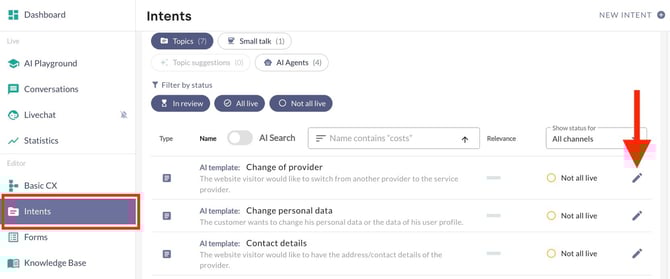
The Intents section contains a complete list of all editorial topics and AI agents created for the AI chatbot. At the top of the page, you can filter the view by topic.
-
Clicking the pencil icon next to a topic opens the edit page for that editorial topic.
-
A click on the pencil icon behind a topic opens the topic's edit page.
-
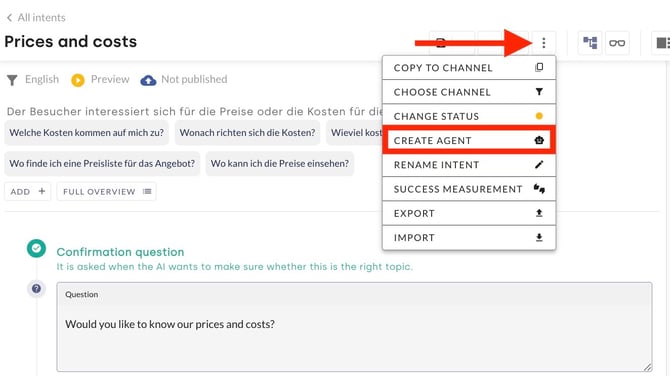
In the reply content editor for the editorial topic, you can convert a reply into an agent via the three-dot menu. Click the Create Agent button to create the agent.
-
Click Save to complete the change.
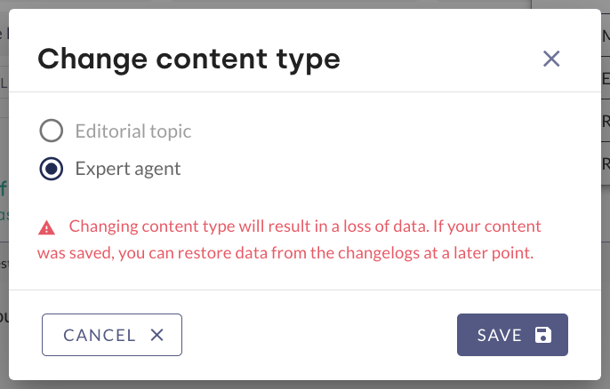
When conversing a topic into an agent, all previous content in the response will be lost! We therefore strongly recommend saving any editorial content you have created previously. This is the only way to restore it using the change log which is described in this article.
2.2 Directly (via the Knowledge Base)
- AI Agents are added via the Knowledge Base menu item by clicking on the plus icon in the top right-hand corner.
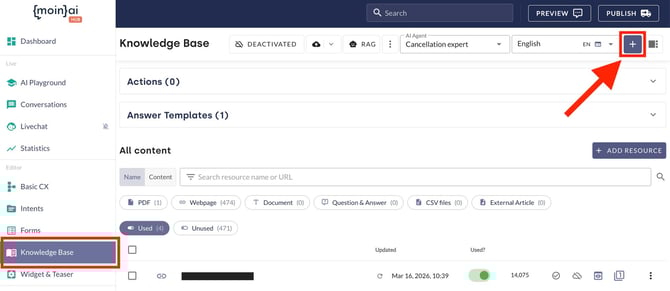
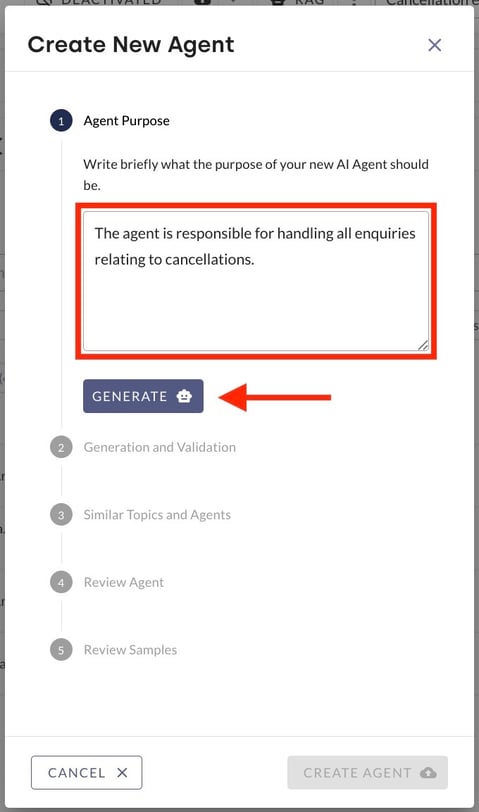
- Then, the input mask Create new agent opens in which the purpose of the AI agent is described. A click on Generate triggers the second step, in which the input is saved and validated.
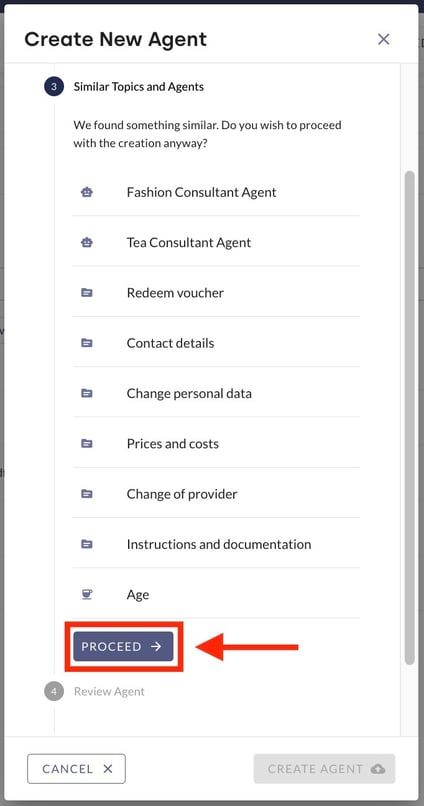
- The AI checks whether an existing AI agent already covers the purpose. If non of the proposals fit, clicking on Proceed at the bottom opens the next input field.
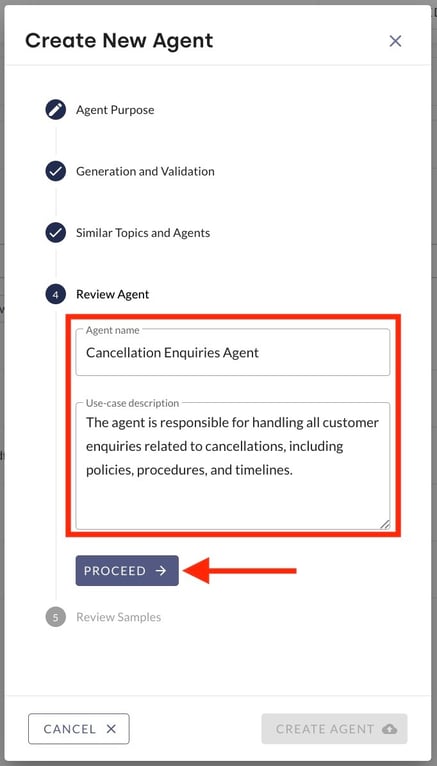
- Here, the AI agent name and application description can be edited again. Once all changes have been made, the AI agent is reviewed by clicking Proceed.
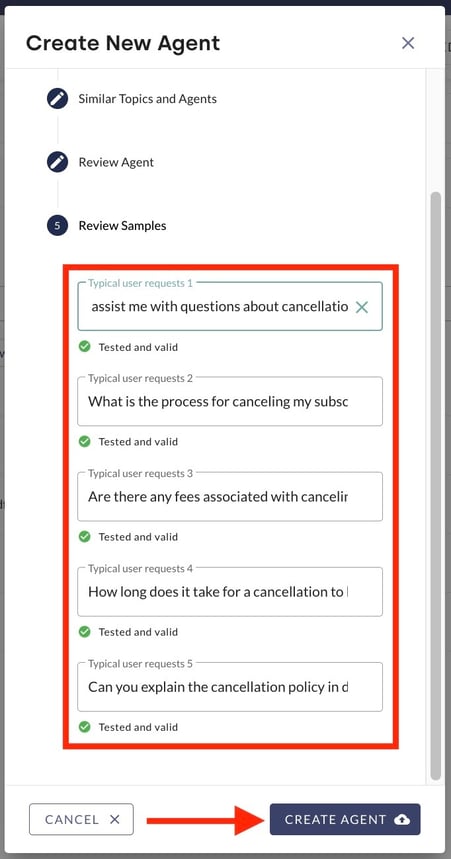
- In the last step, 5 sample enqueries are listed, which the AI agent uses as a guide. Those can be customised. Finally, the AI agent is created by clicking Create Agent.
2. Allocate resources & knowledge management
The performance of an AI agent is directly linked to the quality of the underlying database. Once created, resources must be allocated to the knowledge base in a targeted manner.
The following principles apply to effective knowledge management.
-
Focus on expertise: An AI agent should only be allocated resources that cover its specific area of expertise.
-
Avoid redundancy: The inclusion of irrelevant or contradictory information can impair context finding and lead to imprecise answers.
-
Targeted selection: Toggles within the resource list can be used to activate or deactivate individual content (e.g. specific website URLs) for the respective AI agent.
The management of resources and their linking to AI agents is described in this article.
3. Enable / disable AI agents
The AI agent status determines whether or not the AI chatbot can access a specialised agent during a conversation. The status can be set individually for each AI agent
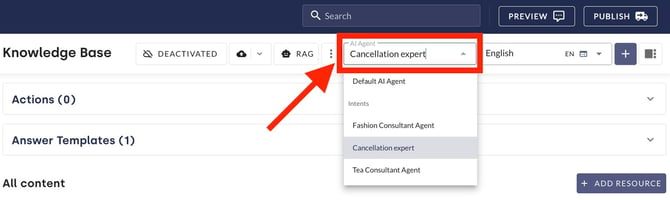
Select the agent in the Knowledge Base in the AI Agent drop-down menu.
- In the menu item Knowledge Base, select the respective agent in the AI Agent drop-down menu.
- Then, click on the Deactivated button. This opens the Change Status window.
- Select the desired status from the following three options:
- Enabled in Live-Bot: The agent is active in live and preview mode.
- Enabled only in preview: The agent is only active in preview mode and in the AI playground. It does not respond to enquiries in live mode.
- Disabled: The agent is not active and cannot respond to enquiries in either preview or live mode.
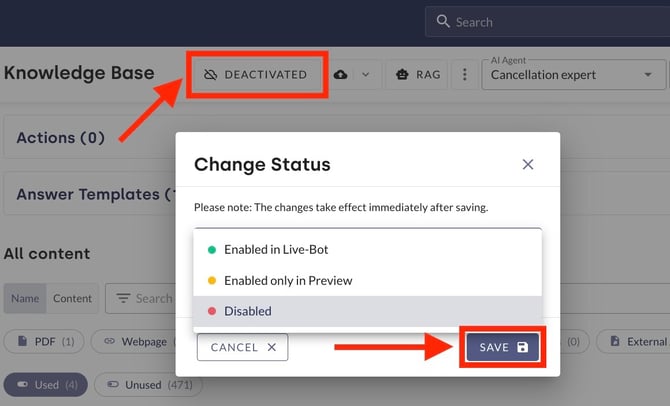
- Click Save.
4. Best and worst use-cases
Choosing the right area of application ensures an efficient reduction in editorial work. The following overview will help you decide between AI agents and editorial topics.
| Scenario | Suitability |
Reason / Example |
|
High effort for low volume (long-tail enquiries) |
🟢 High |
AI agents primarily serve to reduce the editorial effort involved in creating responses. They are therefore generally suitable for areas where high editorial effort is required for a low volume of enquiries. |
| Repetitive topics |
🟢 High |
With existing, good documentation, AI agents are suitable where the answers are very repetitive. |
| High volume of enquiries | 🟡 Limited |
For topics with a higher volume of enquiries, it is necessary to evaluate the answer documentation beforehand. If the documentation is of good quality, AI agents are also suitable here. |
| Key figures & complex resources |
🔴 Low |
However, AI agents are unsuitable in situations where the answers relate to detailed figures and dynamic data. Complex documentation with minor differences and duplications can also make it difficult for AI to generate answers.
However, these challenges can be overcome by using AI actions. The moinAI Customer Success Team can advise you on individual assessments.
|
| Sensitive content |
🔴 Low |
AI agents are also unsuitable if the answer contains sensitive information, e.g. dosages of dietary supplements or information on allergens.
|
| Low effort | 🔴 Low |
Finally, an AI agent is not recommended if only minimal editorial effort is required to create an answer. |
It is advisable to inform users at the beginning that the chatbot uses generative AI to deliver the answers.
5. AI agents with follow-up actions
The follow-up action enables the targeted display of another editorial topic or form after a response from the AI agent. It thus enables conversations to be continued in a meaningful way, guiding users through the processes in a targeted manner. The setup and functionality of follow-up actions is described in detail in this article.
6. AI agent settings
AI agent settings relate in particular to the persona and specific communicative behaviours or characteristics of the AI agents. The specific functionality and global configuration options are described in this article.
Instructions and various formatting options are available for precise control of the content of responses and their visual presentation.
6.1 Instructions
Instructions serve to provide the AI agent with specific, content-related guidelines for generating responses. Unlike the persona or communication rules, the focus here is on subject-specific guidelines.
These are stored in the Hub under the Knowledge Base menu item via the RAG button in the Instructions section.
Instructions can only be included in the guidelines under certain conditions to prompt the AI agents to ask follow-up questions (e.g. ‘If X is missing, ask for Y’). Detailed explanations and practical examples on how to create effective instructions can be found in this Knowledge Base article.
6.2 Formatting in messages
By default, replies are displayed as plain text. To improve readability and organisation, messages can be formatted, allowing content to be presented more clearly using formatting options such as bold, italics or lists. It is also possible to display data in tables or show code blocks.
-
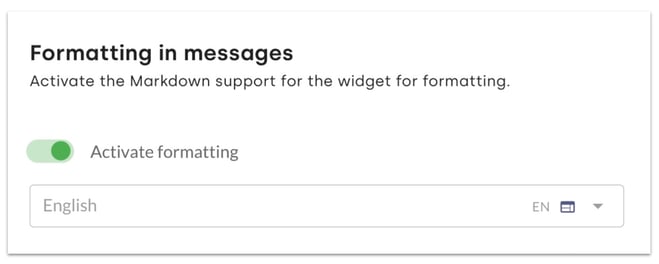
This can be enabled under Bot Settings → General settings & Privacy.
-
The Activate formatting toggle activates the feature for each channel individually.
-
Clicking Save activates the feature.
Controlling formatting
There are two options available for precisely controlling the display:
-
General instructions: In the Knowledge Base menu, under RAG, you can store permanent instructions (e.g. ‘Always display prices as a table.’).
-
Content feedback in the AI Playground: In the AI Playground, response generation can be optimised through direct feedback. Here, you can specify that responses should be output in a particular format in future. This serves to refine the response behaviour in a targeted manner.
To ensure consistent formatting, this must be combined with appropriate instructions (see chapter 6.1) or feedback in the AI Playground. An example of such an instruction is ‘Always display prices as a Markdown table’.
A complete overview of all available formatting options (e.g. bold text, lists or links) and display examples can be found in this article.
7. Test AI agents
Once the resources and instructions have been configured, their functionality is checked in the AI playground and preview. Various user queries can be simulated there. This serves to ensure that the AI agent correctly retrieves the desired information from the knowledge base and processes it according to the specifications.
| Symptom | Cause | Solution |
| Different topic is recognised |
If a different topic is played instead of the AI agent, the underlying question intention is already covered by another area. |
No new agent is required. Knowledge sources must be added to the existing agent. |
| Status ‘unknown’ is displayed |
If the status ‘unknown’ appears, the area of application of the AI chatbot is not defined precisely enough. |
Clearly define and specify the intended use to increase contextual knowledge. This leads to a broader understanding of incoming enquiries. How to define an area of application is described in this article. |
| No response from the agent |
The AI agent is disabled by default. |
Enable the agents individually in the knowledge base (see chapter 2). Without selecting an enabled status (live or preview), the AI agent is not available to provide answers. |
Additional information on generally improving the responses generated by the AI chatbot is described in this article.