![logo_moinai-full-transparent-1.png]](https://helpcenter.moin.ai/hs-fs/hubfs/logo_moinai-full-transparent-1.png?height=40&name=logo_moinai-full-transparent-1.png)
Dreaming supports the continuous quality control of the Agentic AI. The feature evaluates requests automatically at regular intervals, identifies unanswered topics and qualitative weaknesses, and delivers concrete recommendations that can be applied directly in the Hub.
- How Dreaming works
- Requirements
2.1 Licence and availability
2.2 Minimum number of conversations
2.3 Data retention periods
2.4 Permissions - Dashboard
3.1 Metrics
3.2 Filters
3.3 Insight cards
3.4 Remove insights - Insight types
4.1 Topic Insight
4.2 Knowledge Insight
4.3 Quality Insight
4.4 Structure Insight
1. How Dreaming works
Dreaming detects and prepares gaps in the conversation flow automatically in the background. It runs through a four-stage process every week, and the results appear in the Hub at intervals that depend on the licence:
- Data collection: The system records the conversations held through the Agentic AI and extracts the requests made by users.
- Topic clustering: An AI model analyses how similar the requests are in meaning and groups them into precise topic areas, known as clusters. Two questions worded differently but with the same intent count as one concern.
- Insight analysis: Dreaming compares the clusters against the existing structure of the AI agents and against the knowledge sources in place. It also evaluates answer satisfaction, drawing on user feedback and Human Takeovers.
- Dashboard delivery: The results are prioritised and published in the Hub together with concrete recommendations, so that targeted improvements take only a few clicks.
Dreaming is an analysis tool: it shows gaps and recommends actions, but it does not change anything itself. Changes to AI agents and the Knowledge Base are always made by your own team in the Hub.
2. Requirements
2.1 Licence and availability
The core functions of Dreaming are fully available regardless of the licence model. The analysis runs automatically in the background every week. Starting the analysis manually during operation is not possible.
The licence affects only how often new results and optimisation potential appear in the Hub. Depending on the licence model, the data updates at different intervals.
- Business: 90 days (quarterly)
- Growth: 30 days (monthly)
- Professional: 7 days (weekly)
New results appear at the start of each period, not exactly on the first calendar day but on one of the first working days.
For details on your own licence and the features it unlocks, contact the Customer Success Team at customersuccess@moin.ai.
2.2 Minimum number of conversations
Dreaming needs at least 200 conversations in the selected analysis period. Below that number, the data is too thin to form reliable topic clusters.
2.3 Data retention periods
The configured retention period for Agentic AI conversations directly affects the data available to Dreaming. A shorter retention period reduces the number of conversations the analysis can draw on.
With very short retention periods, match the retention period to the update interval of your licence so that the analysis works from a complete set of data. The article on data protection at moinAI covers deletion periods in more detail.
Deleting original conversations for data protection reasons has no effect on insights already generated. Once extracted, insights remain in Dreaming and stay available in the dashboard.
2.4 Permissions
Dreaming is only visible to users with the Owner or Editor role. Users with the Viewer role cannot see it. The permissions of each role are described in the article on user management.
3. Dashboard
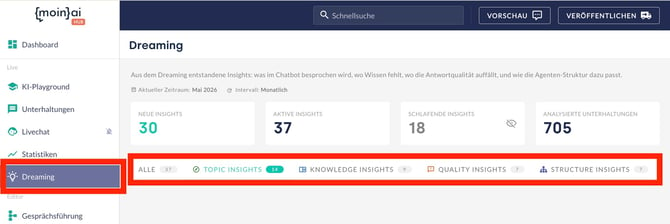
Open Dreaming in the moinAI Hub through the Dreaming menu item in the sidebar.
3.1 Metrics
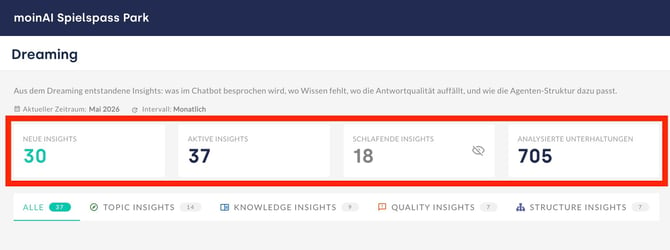
The four cards at the top of the dashboard show the current state of the optimisations:
- New Insights: Number of gaps detected since the last run.
- Active Insights: Unresolved findings still waiting to be worked on.
- Sleeping Insights: Insights that no longer occur, either because they have been resolved or because users no longer interact the way they used to.
- Analysed conversations: Number of conversations evaluated for the current run. Dreaming does not check every conversation, only those that may contain an insight.
If there are no active insights, the dashboard says so and offers a button to show the sleeping insights from earlier periods.
3.2 Filters
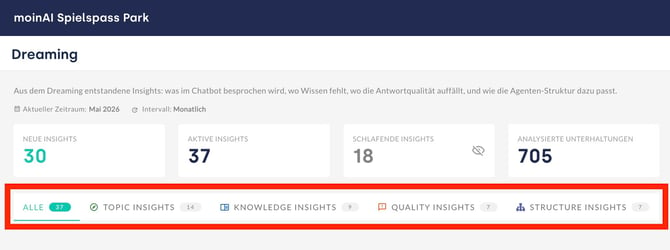
The filters sort the insight list by type:
- All: Complete list of every gap detected.
- Topic Insights: Findings about missing AI agents.
- Knowledge Insights: Findings about missing knowledge resources.
- Quality Insights: Findings about quality and answer problems.
- Structure Insights: Findings about problems in the information structure.
3.3 Insight cards
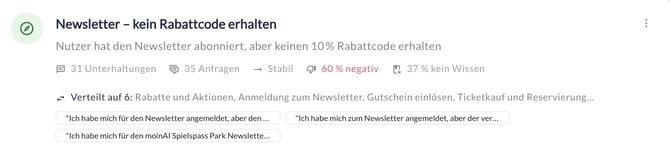
Every finding appears on its own insight card. In the list, the cards are grouped by theme, and each group shows how many insights and requests it contains. Each card holds the following elements:
- An automatically generated name and a summary of the topic.
- The AI agents and topics the requests are spread across.
- Number of conversations.
- Number of requests.
- A trend compared with the previous run, showing whether the insight is growing, stable or declining, or whether it is new.
- The share of Agentic AI answers rated negatively, as a percentage.
- The share of requests that went unanswered because knowledge was missing, as a percentage.
- Real, anonymised user requests from the cluster, to put the finding in context.
3.4 Remove insights
Where an insight is deliberately left alone, because it falls outside the remit of the Agentic AI or because it is wrong or irrelevant, remove it permanently through the three-dot menu with Reject insight. The insight can reappear in a later analysis if users raise the topic again.
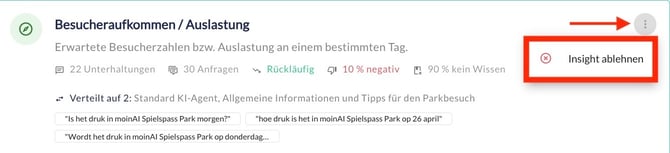
Insights that stop occurring, and are therefore no longer relevant, move to the Sleeping Insights card.
4. Insight types
Dreaming sorts the gaps it finds into four types: Topic Insights, Knowledge Insights, Quality Insights and Structure Insights. Each type follows its own detection logic and comes with a recommendation tailored to it. A recommendation only takes effect once the team applies it in the Hub. The All filter shows every gap in one list. Removing an insight works the same way for all four types and is described in Remove insights.
4.1 Topic Insights
A Topic Insight signals that users repeatedly ask about a subject the current structure of AI agents does not cover.
- Detection logic: Dreaming identifies requests that none of the existing AI agents can answer and that differ clearly in meaning from the existing structure.
- Recommended action: Create a new AI agent for this subject. The article on AI agents explains how to set one up and what to watch out for.
Example
An online shop runs an Agentic AI platform with active AI agents for “Delivery status”, “Returns” and “Payment methods”. Dreaming identifies a new cluster of more than 80 requests about “Gift cards”, asking how to redeem them, where the voucher field sits in the checkout, and whether they are valid in store. Since no AI agent covers these requests, the system reports a Topic Insight and recommends a new AI agent for “Gift cards and vouchers”.
Insight details
Click an insight card to open the insight details.
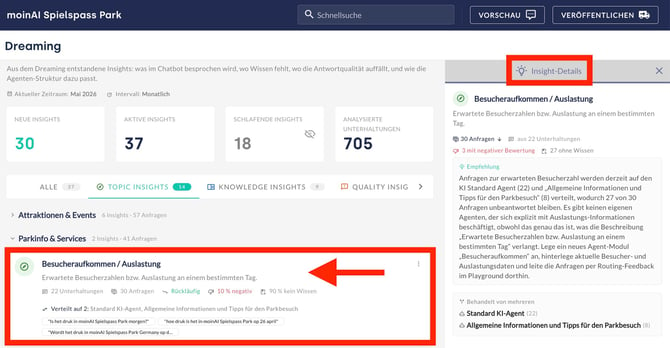
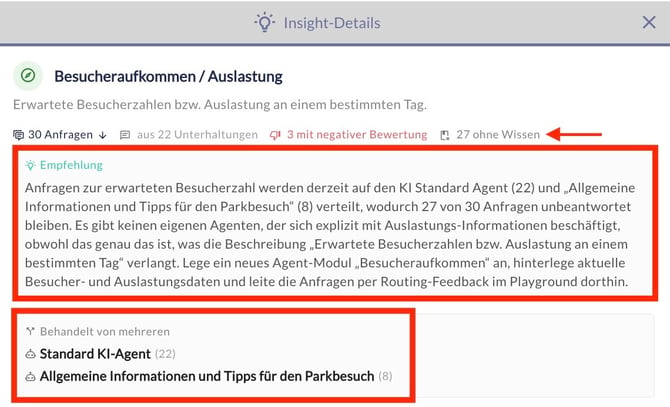
Below the title and a short summary of the topic comes an overview of all requests, the total number of conversations, the number of conversations rated negatively, and the number of conversations without knowledge.
Underneath sits a recommendation based on the findings. It describes the current situation briefly and names concrete steps for closing the topic gap and answering future requests better.
After that come the AI agents and topics that have handled the topic, or a matching AI agent or topic. A robot icon marks an AI agent, an open book marks a topic. The number in brackets shows how many conversations on the topic that AI agent took part in.
History
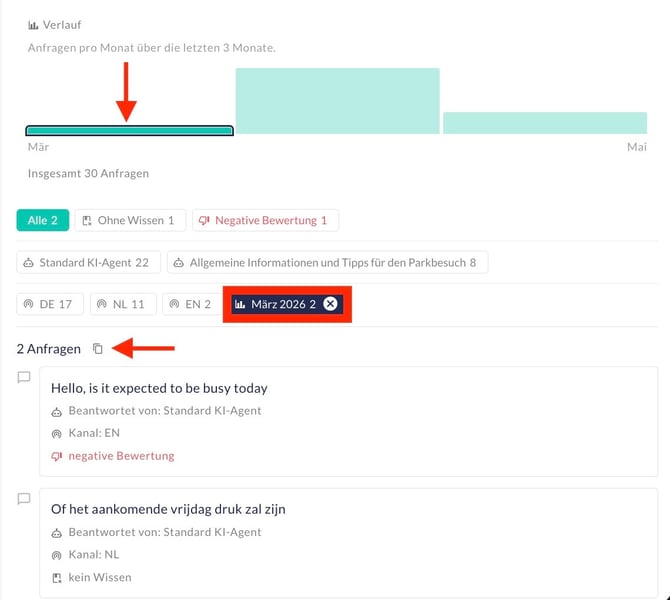
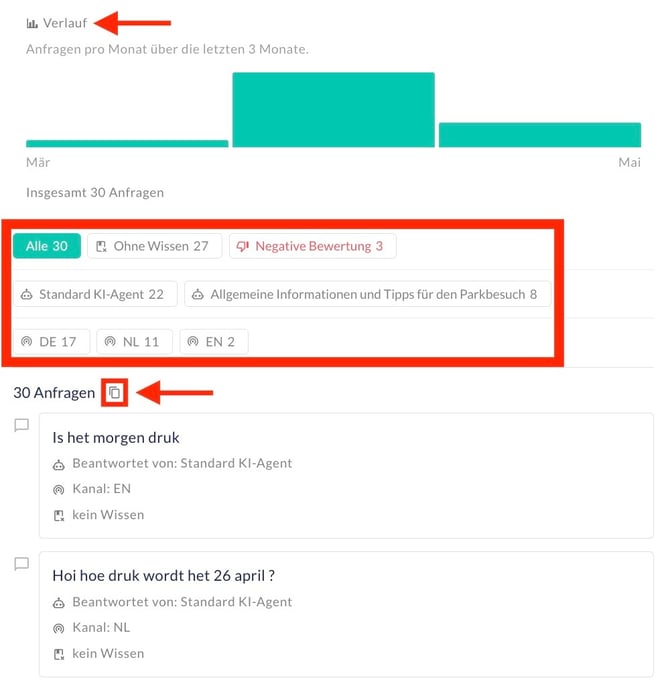
The bar chart below shows how requests developed over the most recent periods. The periods follow the update interval of the licence, for example per month over the last three months or per quarter over the last two quarters. Click a bar to see the requests and topics for that period. The list of requests underneath then covers that period only. A second click on the bar, or a click on the X in the filter row, clears the selection.
List of requests
All requests appear at the end. Click a request to see the full conversation. The list can be filtered: by month through the bar chart, by AI agent, by channel, and with the No knowledge and Negative feedback filters. To copy all conversations, or only the filtered ones, click the document icon.
4.2 Knowledge Insights
A Knowledge Insight shows that requests reach the right AI agent, but that the agent finds no suitable source in the Knowledge Base to answer them.
- Detection logic: The system filters out requests where the Agentic AI could not generate an answer from the Knowledge Base despite correct routing.
- Recommended action: Add a suitable knowledge resource to the Knowledge Base for the AI agent concerned. The article on adding resources describes how.
Knowledge Insights are identified only when the Agentic AI platform has Generative AI enabled. Without that feature, this insight type does not appear.
Example
A travel portal runs an AI agent called “Rebooking”. Users regularly ask it about the terms for changing a name on an existing booking. The AI agent is addressed correctly but cannot answer, because the Knowledge Base holds no information on name changes. Dreaming reports a Knowledge Insight and recommends adding a knowledge resource to the AI agent.
Insight details
The insight details for Knowledge Insights work in the same way as the insight details for Topic Insights.
4.3 Quality Insights
A Quality Insight shows that an AI agent does answer, but that users rate those answers negatively more often than average. Alongside direct feedback (thumbs down), the rating also draws on sentiment analysis and handovers to the live chat.
- Detection logic: The system identifies clusters within an AI agent where the satisfaction rate sits significantly below average.
- Recommended action: Revise the AI agent instructions and adjust or extend the knowledge resources. The article on the Knowledge Base covers this in more detail.
Example
An energy supplier runs an AI agent for “Submitting a meter reading”. For requests about the first reading after moving in, 60 % of the ratings are negative. The general answer from the AI agent does not address this special case precisely enough. Dreaming reports a Quality Insight and recommends adjusting the AI agent instructions for the sub-topic “Moving in and first reading”.
Insight details
The insight details for Quality Insights work in the same way as the insight details for Topic Insights.
4.4 Structure Insights
A Structure Insight signals that one topic is spread across several AI agents and that a clearer assignment would make requests easier to handle.
- Detection logic: Dreaming identifies clusters where the same user concern is picked up by several AI agents in parallel, with no clear responsibility.
- Recommended action: Assign the topic to a single AI agent, so that future requests are answered reliably and consistently. The article on connecting resources to an AI agent covers this.
Example
A telecommunications company runs an Agentic AI platform with AI agents for “Contract renewal”, “Tariff change” and “General questions”. Dreaming identifies that requests about “Replacing a SIM card” are picked up by all three AI agents, with no clear boundary. Because responsibility is split, the answers come out inconsistent. The system reports a Structure Insight and recommends assigning the topic to a single AI agent.
Insight details
The insight details for Structure Insights work in the same way as the insight details for Topic Insights.